File Size: 4.4 MB
Next-Generation Reverb | Convex Audio’s Atrium is an acoustic space simulation plug-in that delivers realistic and immersive sound experiences with minimal effort and maximum customisability.
Why Atrium?
Atrium offers the perfect mix of a high-quality realistic-sounding reverb, easy usability and maximum customisability. Atrium also offers advanced features such as cross-instance synchronisation and more.
But most importantly, Atrium provides a holistic solution to reverberation, stereo positioning and stereo width, as well as depth perception.
No combination of panning, stereo positioning tools and conventional reverbs can create such a convincing stereo field, room impression, and depth perception as Atrium.
Atrium does it all, while being easy to use and keeping the maximum amount of customisability and flexibility of algorithmic reverbs.
Creating your custom acoustic space is easy
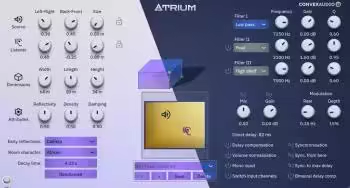
Drag the room to your desired size, position the audio source and listener, and enjoy the result that accounts for the stereo positioning information and stereo width, as well as depth information.
Use the advanced controls to sculp the sound further and make it uniquely yours, or try some of the supplied presets.
Synchronisation
Thanks to Atrium’s Synchronisation feature, it is incredibly easy to place multiple instruments or other sound sources into the same room. Use it to quickly and intuitively create a realistic and holistic room impression, including the sense of both direction and depth for each individual instrument. It’s a big time-saver for more complicated setups and gives you a great overview at all times.
Atrium’s Synchronisation feature makes it easy to keep track of instruments at various positions. Showcasing the “Light” theme.
Simply add an instance of Atrium to each sound source that you want to place into your room and click the Synchronisation button. Enable Sync. from here in the instance you want to work from, and the room configuration will be synchronised across all Synchronisation -enabled instances. Keep track of up to 16 synchronised instances via the 2D room representation.
Additional features
• Multi-level Preset Manager that comes with a variety of great-sounding rooms of different shapes and sizes.
• Resizable GUI to accommodate different screen sizes and preferences.
• 3 parametric filters for colouring and resonance control, as well as reverb pitch modulation for more creative purposes.
• Self-documented user interface. Hover your mouse over any control element and a tooltip at the bottom of the screen gives a brief explanation of what that control element does.
• Randomise button for instant and easy inspiration and experimentation.
• Control over early reflections, various room attributes, and more!
Due to its flexibility and ease of use, Atrium fits into any workflow and is suitable for any project that wants a high-quality reverb or accurate stereo positioning. Whether it is music production, sound design for film and games, podcasting or something else entirely that involves audio processing. Atrium delivers a great sound, quickly and easily.
Download rapidgator
https://rg.to/file/67238b534cddd1885791dc7faed9ec26/Convex_Audio_Atrium_1.2.0_Patched_Incl_Keygen_MOCHA.rar.html
Download nitroflare
https://nitroflare.com/view/E9C54879DD90CC2/Convex_Audio_Atrium_1.2.0_Patched_Incl_Keygen_MOCHA.rar
Download 百度网盘
链接: https://pan.baidu.com/s/1svNqsIi6B-g4FxTXyPP2Mg?pwd=vd76 提取码: vd76
转载请注明:0daytown » Convex Audio Atrium v1.2.0