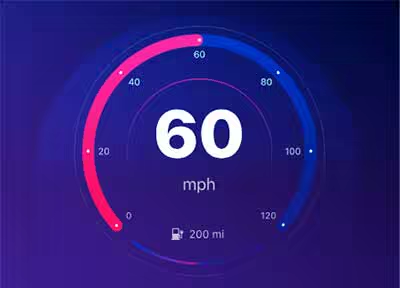
这门课程的设计非常精准,紧扣 iOS 18 的新特性(如控制中心定制化、Apple Intelligence 视觉风格)与 Figma 的高阶应用。
- 视觉风格定位:利用 Figma 的 Arc Tool 制作仪表盘和电量环,结合 层级模糊 (Background Blur) 和多重渐变,营造出科技感十足的“玻璃拟态”或“深色模式”界面。
- 交互逻辑:针对车载场景,重点在于“大面积点击区域”和“关键信息可见度”。
- iOS 18 特性:可以加入可定制的控制组件(Widgets),模拟 iOS 18 锁屏或控制中心的交互手感。
Sourasith Phomhome | Duration: 3 h | Video: H264 1920×1080 | Audio: AAC 48 kHz 2ch | 2,51 GB | Language: English
Design and Prototype for iOS 18 is an immersive course that equips you with the skills to create stunning, user-friendly mobile applications. From mastering Figma to understanding iOS 18’s latest design principles, you’ll learn to craft two real-world apps – a Car Control interface and an AI assistant.
Welcome to our course on Design and Prototype for iOS 18! This course is divided into three main parts: Design, Prototype, and Implementation. I’ll guide you through the process of designing a beautiful user interface for iOS using Figma, creating interactive and dynamic prototypes, and implementing your designs into code. Whether you’re a beginner or an experienced designer, this course will provide you with practical knowledge and hands-on experience.
You will be excited to create two iOS 18 designs: a Car Control app and an AI app, each with its unique style. In the first part, we will design a Car Control app inspired by Apple’s CarPlay, Tesla, and other car apps. This design will be more complex and will help improve your skills and teach you how to use Figma effectively. You’ll use custom shapes, create progress rings with the arc tool, learn how to use gradients to achieve the desired effect, and use blurs to make your design stand out.
 Password/解压密码www.tbtos.com
转载请注明:0daytown » DesignCode – Design and Prototype for iOS 18