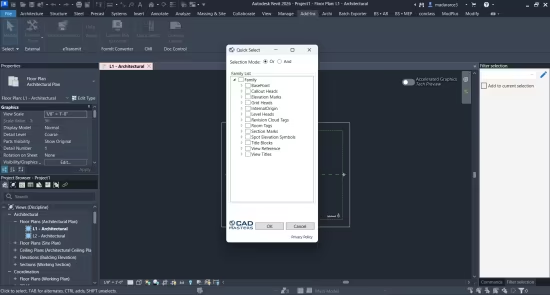
RQuick Select 2027 是由 CAD Masters, Inc. 开发的一款专为 Autodesk Revit 设计的高效插件。它为 Revit 用户提供了一个类似于 AutoCAD 中“快速选择”(Quick Select)的功能,极大地简化了在复杂模型中查找和筛选特定元素的过程。
- 属性筛选选择:允许用户根据元素的族类型(Family Type)及其特定属性(Properties)来快速选择模型中的元素。
- 层级化浏览:用户可以展开特定的元素或族类型,并勾选所需属性以精确缩小选择范围。
- 提高生产力:旨在解决 Revit 原生选择工具在处理大量构件时不够直观的问题,是 Autodesk App Store 上的热门产品。
- 版本兼容性:2027 版本专门针对最新版本的 Revit 环境进行了优化,支持 Win64 系统。
-
File size: 1.9 MB
Quick Select command for Autodesk® Revit® to select by element type and its properties. Expand the element or family type and select the properties that you wish to filter by. Click OK and all those elements will be selected.
When in “Or” mode, the command will select all elements that match any of the properties.
When in “And” mode, the command will only select elements that match all the selected properties.
Note that if you have any elements selected when you initially run the command, there will be a prompt to only use the selected objects. Use this to select from a particular view or narrow down your selection.
Compatible with
Autodesk Revit
Version: 2027
Download rapidgator
https://rg.to/file/12a799feb5ba3d29884d7dc6ef773f7c/CAD_Masters,_Inc._RQuick_Select_2027_27.0.0.rar.html
Download nitroflare
https://nitroflare.com/view/6EBFCA90E0E3A50/CAD_Masters%2C_Inc._RQuick_Select_2027_27.0.0.rar
Download 百度网盘
链接: https://pan.baidu.com/s/1bA4y4_hR40lzuW9RgCF0kA?pwd=6hxb 提取码: 6hxb
转载请注明:0daytown » CAD Masters, Inc. RQuick Select 2027 v27.0.0