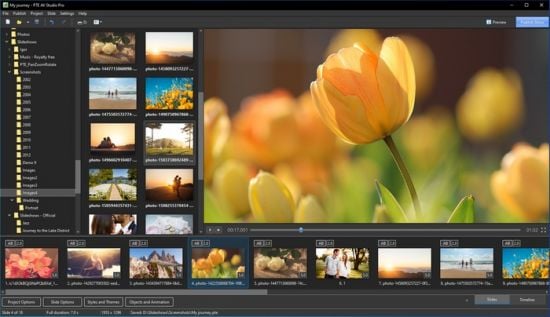
一款专业出众的幻灯片制作工具,软件能够添加照片,视频剪辑和音乐。使用关键帧动画和幻灯片样式。在“时间轴”视图中编辑音频片段,支持PC、HD和4K视频、移动设备的输出。,软件能够添加照片,视频剪辑和音乐。使用关键帧动画和幻灯片样式。在“时间轴”视图中编辑音频片段,支持PC、HD和4K视频、移动设备的输出,使用软件,您可以通过简单的步骤就在几分钟内为您的PC、电视和移动设备创建令人印象深刻的照片和视频幻灯片。并且不管是专业摄影师或者是普通的爱好者都能够轻松完成操作,您可以自定义添加喜欢的照片、音乐、视频剪辑等,还可以应用各种效果,如平移、缩放、旋转、3D变换、蒙版等,支持实时预览,这样的话您可以根据实时效果进行修改和编辑,具有最高质量的图片和流畅的动画播放。您可以使用时间轴视图功能来将您的幻灯片和多条轨道上的音频剪辑进行同步,提供丰富的模板动画让您使用,让整个创建过程更加简单便捷
Windows x64 | File size: 110.3 MB
Create professional photo slideshows in PTE AV Studio Pro (PicturesToExe). Add photos, video clips and music. Use Keyframe animations and Slide Styles. Edit audio clips in the Timeline view. Output for PC, HD and 4K video, mobile devices.
For Enthusiasts and Professional Photographers
PTE AV Studio 10 offers you full creative control for your projects. Use the timeline view for perfect synchronization of slides with audio clips on multiple tracks. Powerful keyframe animations with effects. More than 125 templates/styles of animations will help you to easily create your slideshow.
Pan, Zoom, Rotate, 3D
Adjust pan, zoom, rotate, 3D transformations.
Control opacity, blur, unsharp mask, and color effects.
Nested Animation
Create complex parent-child animation of objects.
Images and Video Clips
Mix images and video clips together on the screen.
Timeline View
Add and view multiple audio tracks which may be played simultaneously. Synchronize slides with audio clips on the timeline using time points. Link audio clips with slides.
Audio Editor
Envelope tool (keypoint control of sound volume). Edit audio clips: fade in/out, start time, duration, cross-fading.
Objects
Add images, video clips, text captions, masks, interactive buttons and more.
Keyframe Animations
Keyframes work like waypoints. Add first keyframe and adjust position and size of an object. Add last keyframe and adjust the final position of an object and its parameters. PTE AV Studio will animate the object between these keyframes using pan, zoom, rotate etc.
Color Adjustments
Adjust the brightness, contrast, levels, hue, saturation of an image/video. Apply a sepia effect and other color filters. Support of color profiles.
Image Adjustments
Crop images and videos, add beautiful white frame and drop shadow. Apply dynamic blur effect. Use zoom in a frame. Apply masking effect.
Color Management
Support of Adobe RGB monitors in preview and executable shows.
Executable Shows for PC
PTE AV Studio allows you to create slideshows as executable files for PC and Mac.
The highest picture quality is possible, because PTE AV Studio uses original images from the project. Smooth playback of animations synchronized with a monitor refresh rate. Automatic or manual slide advance. Interactive objects with actions. Instant creation of executable files.
Slide Styles and Transitions
125+ customizable slide styles, themes and transition effects. Each slide style allows you to easily adjust several parameters of animation. Create new slide styles, themes and transitions and share with other users.
Text Captions
Add text captions with animation. Create text macros from EXIF metadata and apply to all or selected images.
System Requirements: Windows 11, Windows 10, Windows 8, Windows 7. Only 64-bit
Download rapidgator
https://rg.to/file/59e76f5cf695b232a162e2fd50b7acc2/PTE.AV.Studio.Pro.12.0.2.rar.html
Download nitroflare
https://nitroflare.com/view/A0DE6AF406A4269/PTE.AV.Studio.Pro.12.0.2.rar
Download 百度网盘
链接: https://pan.baidu.com/s/1sZTgYm0RAQWGFE_kyrpodg?pwd=uva7 提取码: uva7
转载请注明:0daytown » WnSoft PTE AV Studio Pro 12.0 Build 2 Multilingual