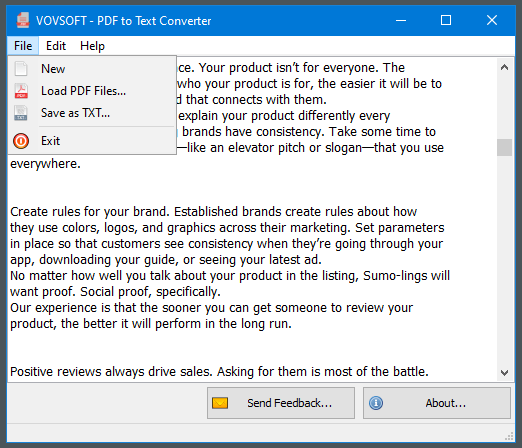
Vovsoft PDF to Text Converter 是一款由 Vovsoft 公司开发的高效、轻量级 Windows 桌面 PDF 文本提取软件。它专注于将本地 PDF 文档中的文字内容快速提取并导出为标准的 .txt 文本文件,为需要批量处理文档、提取文本资料的用户提供了一个无需连网的本地化解决方案。
File size: 7.3 MB
PDF (Portable Document Format), developed by Adobe, is a widely used format that helps people share their documents with each other. However, handling PDF documents requires dedicated software. Vovsoft PDF to Text Converter is a hassle-free software solution that makes it easy for you to convert your PDF documents to texts that can be exported to standalone files. The program can convert PDF files to TXT files without uploading them to online servers.
The main window is minimalist, all available features are as clear as possible, so that even novices can easily extract the contents of their PDF files. You can load more than one file at a time. In other words, you can select multiple documents by manually browsing to their location or using drag’n’drop, then extract their content all at the same time.
All their text is automatically extracted and shown within the main window, while also offering you the possibility to make changes if needed – you can treat it as if it were any other text document on your PC. You can cut, copy and paste words, sentences or paragraphs. When you are done altering the data and you are happy with the result, you can save it as TXT and store it to any folder.
System Requirements: Windows 11, Windows 10, Windows 8/8.1, Windows 7 (32-bit & 64-bit)
Download rapidgator
https://rg.to/file/06685b752f0a3423e8e24890c88d72ca/VovSoftPDFtoTextConverter1.rar.html
Download nitroflare
https://nitroflare.com/view/71B6435C8CE7445/VovSoftPDFtoTextConverter1.rar
Download 百度网盘
链接: https://pan.baidu.com/s/17KGrqDt_ry5cuOzPh1v90A?pwd=fnca 提取码: fnca