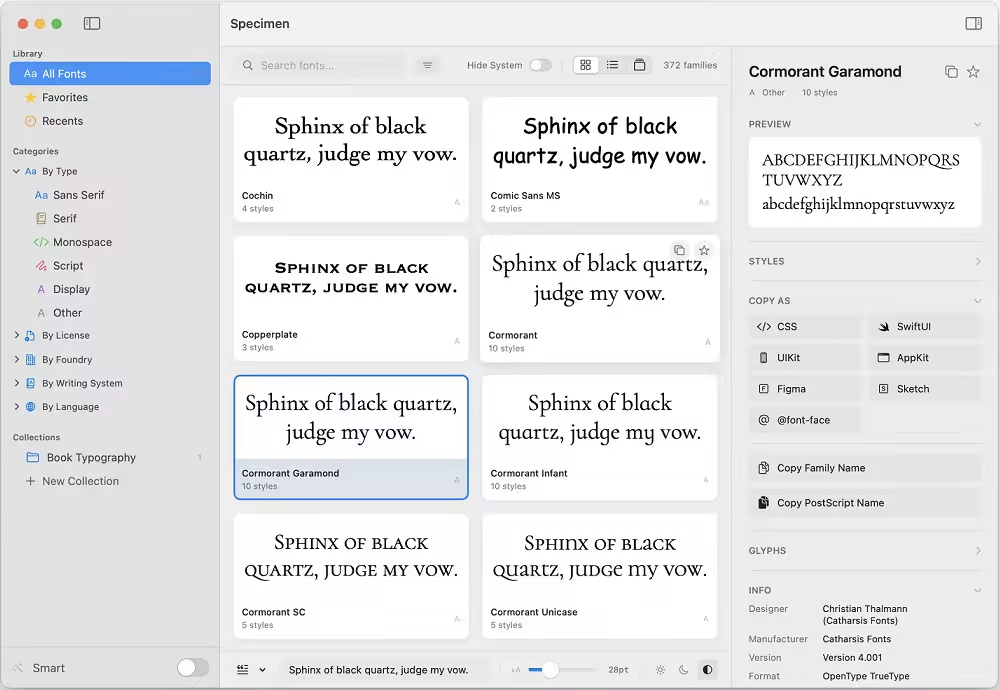
Specimen 是 macOS 平台上功能最强大的字体管理器,专为那些需要比“字体册”更丰富功能的字体爱好者而打造。它支持并排浏览、整理和比较多达 4 种字体,探索 1700 多种 Google Fonts,运行健康检查,控制可变字体轴,并导出专业的 PDF 字体样本表——所有功能都集成在一个简洁优雅的应用程序中。
File Size: 4.7 MB
Specimen is the ultimate font manager for macOS, built for typography lovers who need more than Font Book. Browse, organize, and compare up to 4 fonts side by side, explore 1,700+ Google Fonts, run health checks, control variable font axes, and export professional PDF specimen sheets — all in one elegant app.
Everything You Need to Manage Fonts
Professional tools in an elegant interface, without the complexity.
Smart Organization
Filter by font type, writing system, language support (24 languages), foundry, or license type. Create manual and smart collections. Smart Family Grouping automatically merges related families like Roboto, Roboto Condensed, and Roboto Mono.
Beautiful Previews
Three view modes: Grid, List, and Carousel. Customizable preview text with presets or your own. Adjustable font size and light/dark backgrounds. Quick Look with waterfall preview and full character set.
Side-by-Side Comparison
Compare up to 4 fonts simultaneously with identical preview text. Perfect for choosing between similar typefaces. See how fonts look together before committing to your design.
Discover New Fonts
Browse and install from 1,700+ Google Fonts and Fontshare’s curated collection—directly in the app. Live web previews before installing. No API key required.
Font Health Check
Scan your entire font library for corrupted fonts, exact duplicates, missing glyphs, and legacy formats. Keep your collection clean and trouble-free with detailed diagnostic reports.
Variable Font Support
Full support for variable fonts with interactive axis controls. Adjust weight, width, slant, optical size, and more in real-time. See exactly how your variable fonts behave.
PDF Specimen Export
Generate professional type specimen PDFs with waterfall previews, character sets, style showcases, and font metadata. Perfect for client presentations or your own reference.
Developer-Friendly
Copy font declarations with one click in 7 formats: CSS, SwiftUI, UIKit, AppKit, @font-face, Figma, and Sketch. Show fonts in Finder. Uninstall user-installed fonts safely.
License Type Detection
Automatically infers license types—System, Open Source, or Commercial—based on font metadata. Filter by license to quickly find fonts you can use in commercial projects.
Download rapidgator
https://rg.to/file/b66a655d2b819423a033b2e8d0bb42d8/Specimen_1.0.5_%5BEDiSO%5D.rar.html
Download nitroflare
https://nitroflare.com/view/E8C39D66FD888DF/Specimen_1.0.5__EDiSO_.rar
Download 百度网盘
链接: https://pan.baidu.com/s/1rSrt4s3WPO5xV3Mf4tCBWg?pwd=br85 提取码: br85
转载请注明:0daytown » Specimen 1.0.5 MacOS